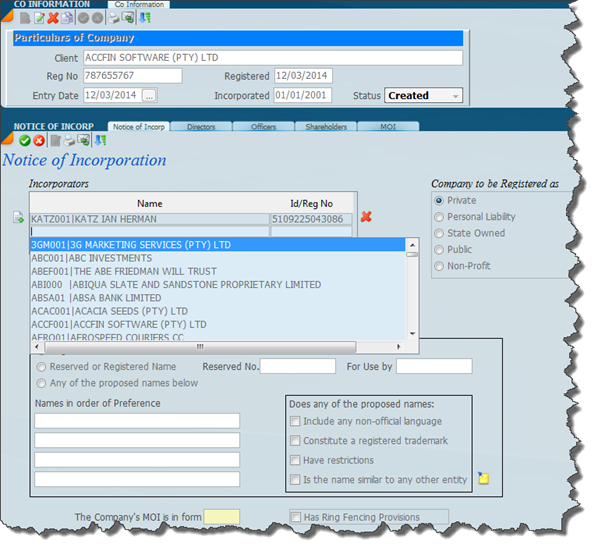
In order to add an incorporator make sure that the screen is set in edit mode by clicking the edit mode icon  and then click on the add incorporator icon to
  the left of the incorporator box which will allow you to add a new incorporator.
and then click on the add incorporator icon to the left of the incorporator box which will allow you to add a new incorporator. As in the screen below you will see that there is now a list of all the possible incorporators in the master file, scroll down to the one that you want and add them as an incorporator. If you want to delete an incorporator, click on the red X on the right hand side and this will delete the incorporator.
If you select the 1st letter of the incorporators name the cursor will jump to that incorporator
OTHER AREAS TO ADDRESS
In order to produce a CoR15 form it is necessary to complete the rest of the screen with as much information as you can. At the early stage of formation some of this information will not be available. If you are creating the circumstances of a company that has already been formed it is best to enter as much of the information as is in your possession.
Was this article helpful?
That’s Great!
Thank you for your feedback
Sorry! We couldn't be helpful
Thank you for your feedback
Feedback sent
We appreciate your effort and will try to fix the article