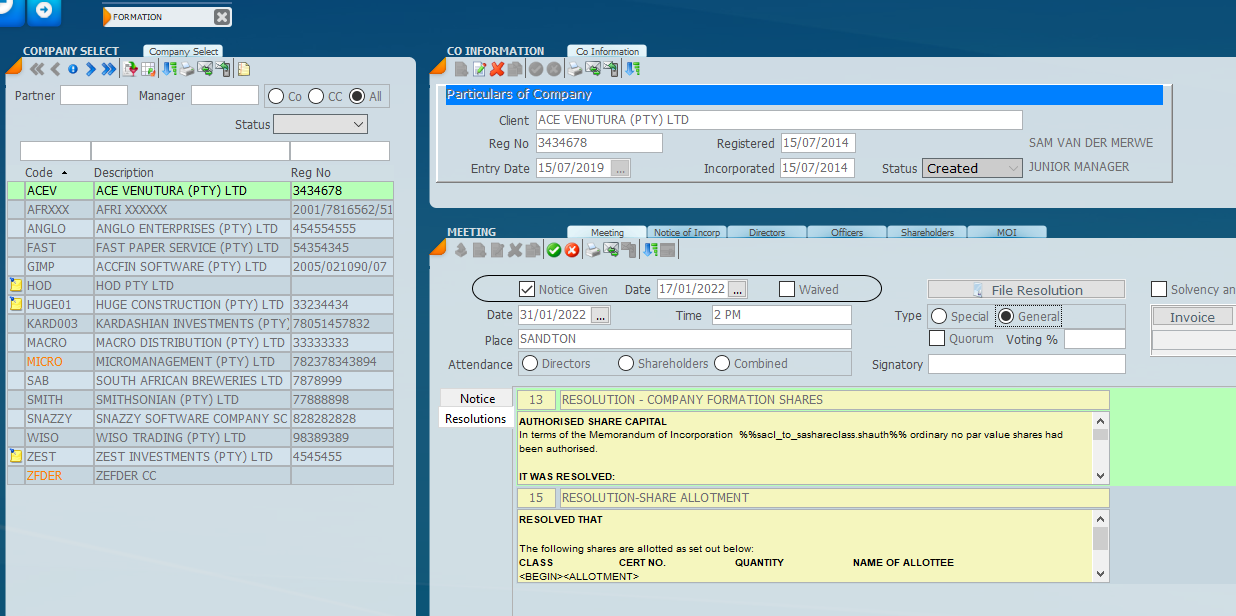
The meeting tab allows the user to indicate what kind of meeting it is, shareholder, director or combined and various other bits of information about notice period, whether it has been waived etc.
The meeting tab is where you can set up resolutions and you will see that there is place for typing free form text that will fit into the resolution or by selecting a paragraph code which will automatically be put into the resolution.
It is also important to note that the meeting tabs works with other parts of transactions, for example if you change an MOI or appoint or resign a director you can use the meeting tab to specify what kind of meeting it is, the dates of notice etc. and produce minutes and resolutions.
Was this article helpful?
That’s Great!
Thank you for your feedback
Sorry! We couldn't be helpful
Thank you for your feedback
Feedback sent
We appreciate your effort and will try to fix the article