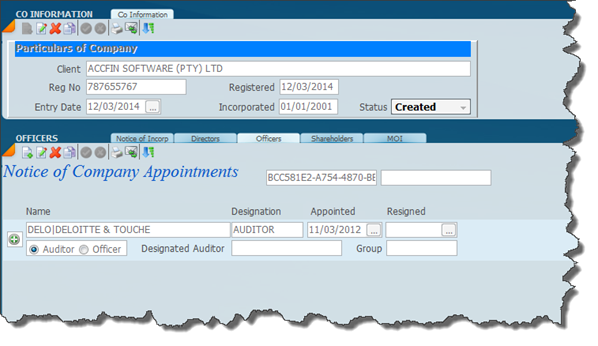
The screen below is set on the officers tab and will allow you to enter any officer to the company. The individual officer must be resident in the master file. In order to enter a new transaction click on the new icon and this will add an additional line to the officer grid.
If you wish to change something on an existing officer appointment click on the edit icon.
The system will allow you to differentiate between an auditor and a officer and where you click on auditor you may enter the designated auditor and this will appear on the CoR44 when printed.
It is not necessary to appoint officers at the incorporation stage.
Was this article helpful?
That’s Great!
Thank you for your feedback
Sorry! We couldn't be helpful
Thank you for your feedback
Feedback sent
We appreciate your effort and will try to fix the article